Yes, Claude
Context
At my current job, the claude CLI is centrally managed with many restrictions. The most annoying one is that it asks for permission for almost every action.
In one experiment, I asked Claude Code to implement a feature and pressed Enter to approve actions 26 times in one minute.
A colleague told me that you can communicate with the tmux server from the command line using:
tmux send-keys -t %{pane_id} <key_id>This opened Pandora’s box 📦💥.
What started as a way to automate repetitive key presses became a small project to explore Unix sockets, message passing, task cancellation, and the differences between threads and async tasks.
You can find the code in the Yes, Claude repository on GitHub.
The features
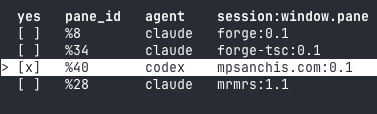
Yes, Claude discovers tmux panes running supported AI CLIs and lets me enable or disable repeated Enter key presses for each pane. When enabled, a background task sends Enter roughly every 500ms.
The requirements
A while loop wasn’t enough for what I wanted to do. I wanted to be able to delegate to Claude Code until a step was done, then come back and continue prompting.
For that, I needed to be able to toggle the loop on and off.
However, that also wasn’t enough. I also wanted to be able to work on several projects or features in parallel. For that, I needed to be able to toggle multiple loops on and off.
One more thing: what if I started a new feature? I wanted newly opened panes running supported AI CLIs to appear automatically, so I could manage them all from one place.
The details
Modules
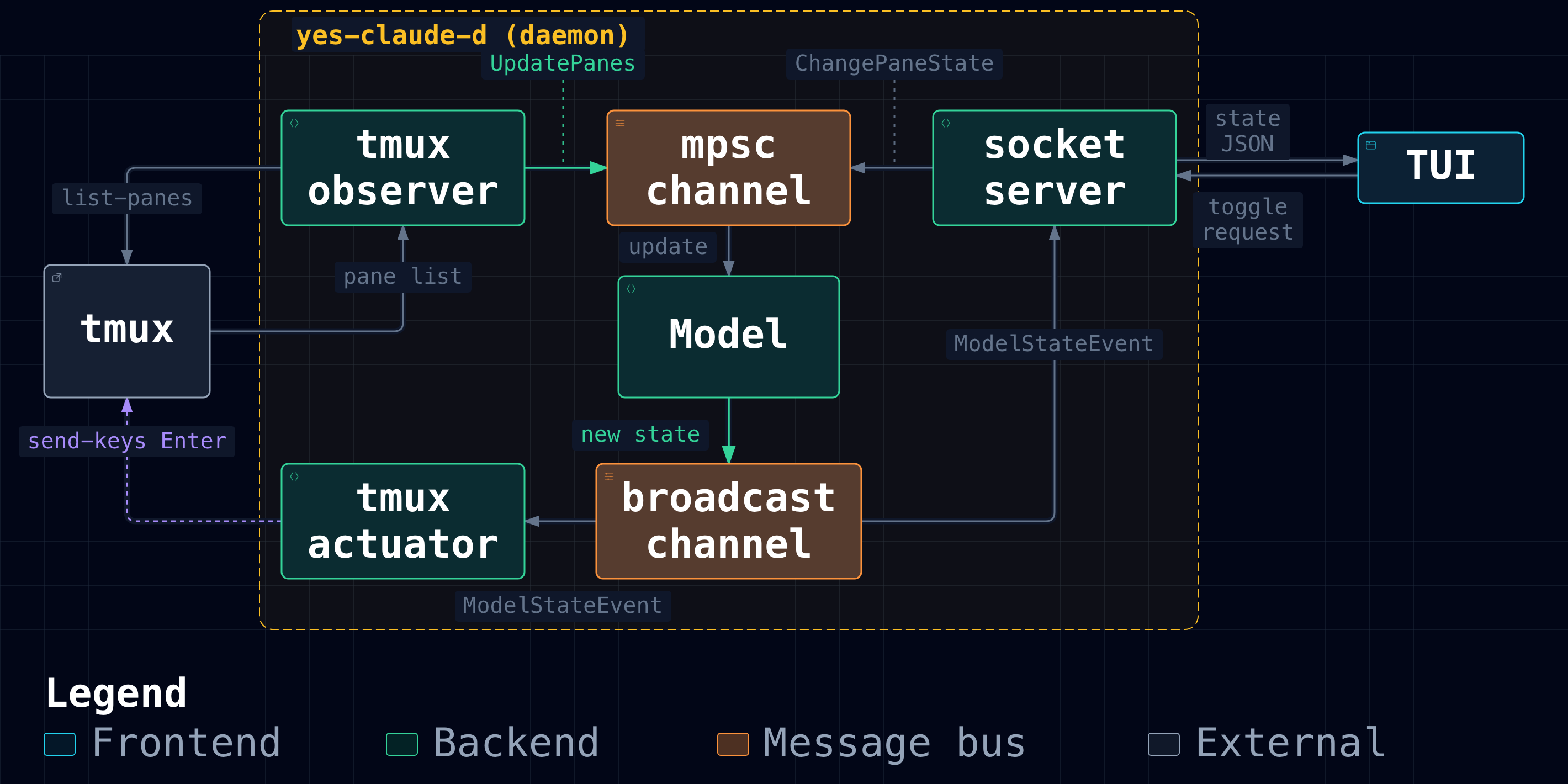
The repository is organised as a Cargo workspace. I divided the code into small crates to make responsibilities and dependencies explicit, at the cost of extra interfaces and project structure for a relatively small application:
- api: [lib] shared data used for communication between crates, including:
- socket path: the location of the Unix socket used to pass messages between processes
- events: the messages exchanged between modules
- types: [lib] shared types, including
PaneMetadataandPaneState - tmux-model: [lib] a struct that combines metadata observed from tmux with the user-controlled “yesing” flag for each tracked AI agent pane
- tmux-actuator: [lib] manages one background task per enabled pane, starting and cancelling tasks as the model changes
- tmux-monitor: [lib] polls tmux roughly every 500ms and sends a snapshot of the supported AI agent panes through a channel
- daemon: [bin] a Tokio-based service that uses all the crates above, plus:
- a socket server to communicate with clients
tokio::sync::broadcastto transmit the state of the modeltokio::sync::mpscto request changes to the model
- tui: [bin] a Ratatui-based terminal UI that lets us toggle which tmux panes are being “yesed”
MVC
I borrowed the model–view–controller (MVC) pattern’s separation of state, presentation, and updates. The daemon’s event loop acts as the controller, while the TUI handles rendering and translates keyboard input into update requests.
The model is a simple Rust struct that exposes two methods:
update_panes_from(&mut self, panes: Vec<AIAgentPane>): updates a localHashMap<u32, PaneState>using an observed state fromtmux-monitorchange_pane_state(&mut self, pane_id: u32, yesing: bool): records whether the pane identified bypane_idis being “yesed”
The view is our TUI, which has three concurrent threads:
- a main thread, which waits for events from the keyboard (key presses) or the socket (broadcast state changes)
- a socket thread, which listens for socket events and sends them to the main thread
- a keyboard thread, which listens for keyboard events and sends them to the main thread
The controller is the loop in the daemon’s main function. It receives each UpdateModelEvent from the socket server or tmux monitor, calls update_panes_from or change_pane_state on the model, and then broadcasts a snapshot of the state.
Communication boundaries
Inside the daemon, Tokio channels connect the monitor, model loop, socket server, and actuator. An mpsc channel carries update requests from multiple producers to the model loop. A broadcast channel distributes model snapshots to the actuator and connected clients through the socket server.
Between the daemon and TUI, events travel over a Unix stream socket as newline-delimited JSON. In the TUI, two threads perform blocking reads from the keyboard and socket, forwarding events to the main thread through a std::sync::mpsc channel.
Task lifetime and cancellation
The actuator reconciles its running tasks against each model snapshot. It starts one task for each newly enabled pane and aborts tasks for panes that are disabled or disappear. Each task repeatedly invokes tmux send-keys, waiting roughly 500ms between invocations.
A small wrapper aborts its task when dropped, so removing an entry from the task map also stops its loop. Dropping a Tokio JoinHandle alone would detach the task, allowing it to continue running. Making cancellation part of the wrapper’s Drop implementation ties the task’s lifetime to the entry that owns it.
Decisions
- The daemon loop owns the model: it is the only code that mutates it. The model combines pane metadata observed from tmux with the user-controlled “yesing” flag for each pane. Other components submit events or consume snapshots rather than sharing mutable access to the model. This gives updates a single processing order and avoids putting the model behind a shared mutex.
- The daemon uses Tokio tasks and asynchronous I/O: I wanted to learn how an async runtime coordinates socket connections, polling, and background tasks. This small application gave me a concrete setting to explore those mechanisms.
- The TUI uses operating-system threads and blocking reads: I deliberately chose a different concurrency model to compare it with the daemon. It uses
std::threadandstd::sync::mpsc, while the daemon uses Tokio tasks andtokio::syncchannels. Both coordinate their work through message passing, giving me a way to compare how they wait for input and manage background work. - The TUI runs separately from the daemon: I wanted to explore process boundaries and IPC. Keeping the automation in the daemon also lets it continue running when the TUI exits.
Next steps
I’ve already added support for other CLIs that behave similarly to claude: Google’s agy and OpenAI’s codex.
I consider the tool to be feature complete for my workflow: I can leave selected panes sending Enter while I work elsewhere, then disable them when I want to review progress or continue prompting.
Some things that would be cool to add are:
- a second UI through a web interface, so that I don’t have to switch terminal tabs or tmux sessions to toggle “yesing” for each pane
- an “admin” view to inspect the daemon and its model
- support for monitoring other terminals outside tmux
- an async version of the TUI, keeping its behaviour the same while comparing cancellation, shutdown, and code complexity with the current thread-based implementation
That last experiment is especially interesting to me. Redrawing the TUI, accepting Unix socket connections, monitoring tmux, and handling keyboard input are independent activities that need to cooperate. I want to use this small codebase to investigate how different concurrency models affect the clarity and lifetime of that work.
More broadly, I’d like to use this project for some “concurrency archaeology”: exploring IPC, nonblocking I/O, I/O multiplexing, event loops and callbacks, state machines, coroutines and green threads, actors, channels, dataflows, and workers and queues. I want to understand how these approaches relate to one another, what problems they solve, and how they could organise the same cooperating pieces in this application.
Useful links
Tools and libraries
- tmux documentation: sessions, windows, panes, and command-line control
- Cargo workspaces: organising related Rust packages in one repository
- Ratatui: building terminal user interfaces in Rust
Concepts and patterns
- Model–view–controller (MVC): separating state, presentation, and input handling
- Message passing in Rust: communicating between threads using channels
- Shared state in Tokio: approaches to sharing and managing state across tasks
- Tokio channels: managing a resource through a dedicated task and message passing
- Tokio broadcast channels: sending updates to multiple receivers
- Unix sockets in Rust: local IPC using Unix stream sockets
Disclaimer
This is a learning project. I do not recommend always accepting every command that an AI agent asks for permission to execute.
Thank you
Thank you to Victor Palade (LinkedIn) for being so creative and unknowingly giving me this idea 😂